
Introduction to AngularJS - Your First Angular Application
Learn how to create your first AngularJS application.

Jennifer Bland
AngularJS is a JavaScript framework designed to create dynamic web app by adding interactivity to HTML. AngularJS will add simplicity and productivity to your websites.
AngularJS is perfect for Single Page Applications(SPA). Common examples of SPAs are Facebook, Twitter and Gmail.
A common misunderstanding is that SPA only have one page of content. That is not true. With a SPA you can navigate to different pages in a website WITHOUT having to load in a new webpage like you would with a traditional website. Angular provides the framework to load this information for you dynamically as you navigate around.
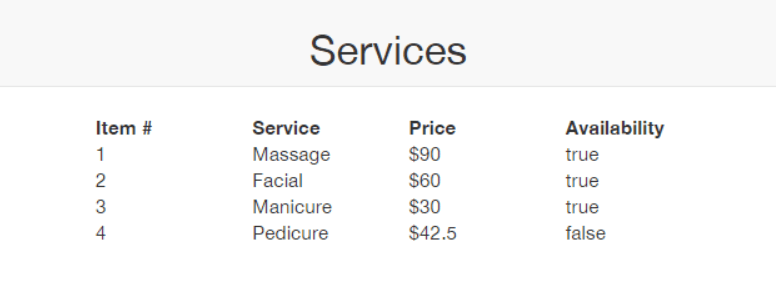
Here is the SPA application that we will be building as your first AngularJS application.
AngularJS Terminology
Directive - adds behaviors to HTML. A directive is how AngularJS teaches the browser new syntax.
Expressions - allow us to insert dynamic values into HTML. An expression can contain text, numbers or even any valid JavaScript code. The value of the expression is inserted directly into the HTML code. Expressions are inserted into HTML by surrounding it with null. Here is an example of an expression.
<div>2 + 2 = {{2+2}}</div>
AngularJS extends HTML attributes with Directives, and binds data to HTML with Expressions.
Module - is were we write pieces of our Angular application. Any dependencies will also be defined in the module.
Controllers - help us get data on to the page. Controllers are where we define our app's behavior by defining functions and values.
Getting Started
Let's first start with creating our index.html file. Here is what it looks like.
<!DOCTYPE html> <html lang="en"> <head> <title>My First Angular App</title> <link rel="stylesheet" href="https://maxcdn.bootstrapcdn.com/bootstrap/3.3.4/css/bootstrap.min.css"> </head> <body ng-app="SpaApp" ng-controller="spaController"> <nav class="navbar navbar-default text-center"> <h2>Services</h2> </nav> <div class="container-fluid"> <div class="row-fluid"><strong> <div class="col-md-4"></div> <div class="col-md-1">Item #</div> <div class="col-md-1">Service</div> <div class="col-md-1">Price</div> <div class="col-md-1">Availability</div> <div class="col-md-4">&nbsp;</div></strong> </div> <div class="row-fluid" ng-repeat="service in servicesList"> <div class="col-md-4"></div> <div class="col-md-1">{{$index + 1}}</div> <div class="col-md-1">{{service.service}}</div> <div class="col-md-1">${{service.price}}</div> <div class="col-md-1">{{service.available}}</div> <div class="col-md-4">&nbsp;</div> </div> </div> <script type="text/javascript" src="angular.js"></script> <script type="text/javascript" src="app.js"></script> </body> </html>
HTML Explained
On the body tag you will find your first Angular directive. The ng-app directive defines an AngularJS application. We have given our app the name of SpaApp. You will see how this name is incorporated into our Angular code when we discuss the contents of the app.js file.
On the body tag is our second Angular directive ng-controller. The ng-controller directive literally controls the data in the Angular application. I have named the controller spaController. It is best practice to attach Controller to the name of any ng-controller.
The div class contains our third Angular directive in the ng-repeat. The ngRepeat directive instantiates a template once per item from a collection. Each template instance gets its own scope, where the given loop variable is set to the current collection item, and $index is set to the item index or key.
When we get to our app.js code you will find an array object called servicesList. The ng-repeat is looping through every item in this area. Using expressions we are printing out an incrementing counter, the service offered, the price and whether or not that service is sold out.
Earlier I gave an example of an expression. Now you get a chance to actually see how an expression is used in an Angular app.
The last part of the HTML file loads our two JavaScript files. One for angular.js and the other for our app.js file.
Angular Explained
angular.module('SpaApp', [])
.controller('spaController', function($scope) {
  $scope.servicesList = [
    {service: 'Massage',  price: 90,    available: true  },
    {service: 'Facial',   price: 60,    available: true  },
    {service: 'Manicure', price: 30,    available: true  },
    {service: 'Pedicure', price: 42.50, available: false }
  ];
});
The name of our module is SpaApp. This is the same name given in the ng-app directive in the body tag in our HTML code.
The module has one controller called SpaController. This name corresponds to the name given to the ng-controller directive in the body tag in the HTML code.
AngularJS will invoke the controller with a $scope object. Scope is the glue between application controller and the view. By attaching the servicesList array to the scope, our application will have access to it within the view.
We print out the name of the service, price and its availability by passing the values from the controller in the app.js to the corresponding expression in the HTML file.
Testing the Code
Next Lessons
- Filter
- ng-show, ng-hide and ng-if
- ng-model
- 2 way data binding