
Intro to Vue - Looping over Lists of Data
Got data? Learn how to loop over it in Vue.

Jennifer Bland
In almost every application you will find that you need to loop over data and display it on the webpage. A good example is a getting data from the backend, possibly filtering the results and showing this to the users. That data could be a list of products, or services or items in a shopping cart. In this lesson I will show you how to loop over lists using Vue's v-for directive. So let's get started.
v-for
Vue includes a built-in directive called v-for. This directive allows you to loop over data regardless if that data is stored in an array, an object or even an array of objects.
Looping Over an Array
For our first example we are going to loop through all the items in an array and generate an unordered list of the items. Here is the basic format for a v-for loop:
<ul>
    <li v-for="item in items">{{ item }}</li>
</ul>
Here is the data in our items array:
data: {
  return {
     items: ['Hammer', 'Circular Saw', 'Torque Wrench']
  };
}
When this code runs it creates an unordered list showing all 3 items. It will look like this. 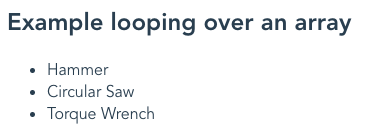
Adding a Key
Vue recommends that you add a key for each item in the list. If there is a change to the values in the array then Vue will use this key to know which item to update in the DOM. You can specify your own key which must be unique or you can use the $index that Vue creates automatically. The key is an optional second argument for the index of the current item. Let's update our example of looping over an array to include this index.
<ul>
    <li v-for="(item, $index) in items" :key="$index">{{ $index }} - {{ item }}</li>
</ul>
Looping Over an Object
You can also use v-for to loop over an object. When you loop over an object the value of the object's key is what is returned in the loop. Here is an object that lists states and their capitals. We will loop over this object.
capitals: {
      Arkansas: 'Little Rock',
      Illinois: 'Springfield',
      Kentucky: 'Frankfort',
      'New York': 'Albany'
}
Here is the code to loop over this capitals object and show list of capitals:
<ul>
    <li v-for="value in capitals">{{ value }}</li>
</ul>
This is the output: 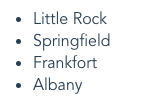
Looping Over an Object - getting key
You can pass an optional second parameter to the v-for directive for an object. This parameter will have the key of the object. Since all keys in an object have to be unique we can use this value as the
<ul>
    <li v-for="(value, key) in capitals" :key="key">{{ key }} - {{ value }}</li>
</ul>
This is the output: 
Looping Over an Object - getting key and index
You can pass an optional third parameter to the v-for directive for an object. This parameter will be the index.
<ul>
    <li v-for="(value, key, index) in capitals" :key="key">{{ index }}. {{ key }} - {{ value }}</li>
</ul>
This is the output: 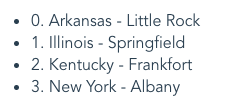
Get The Code
If you would like to follow all the examples provided in this article, I have created a code sandbox for you. Click here to get the code.
Conclusion
This was a short introduction to the process of looping over data in Vue. I showed you examples of looping over an array as well as an object. Follow me on Twitter