
How to Greatly Simplify Your Vuex Store
Learn how to greatly simplify your Vuex store.

Jennifer Bland
As the size of your Vue application grows, the number of actions and mutations in your Vuex store grows too. Let me show you how to reduce this to something more manageable.
What is Vuex
Vuex is a state management pattern + library for Vue.js applications. It serves as a centralized store for all the components in an application, with rules ensuring that the state can only be mutated in a predictable fashion.
How we are using Vuex
We are using Vuex to share state between all the applications in our Factory Core Framework application. Since the framework is a bundle of applications, we currently have nine Vuex stores. Each store has its own state, actions, and mutations. We are using actions in the store to do API calls to the backend. Once the data is returned we use mutations to store it in state. This allows any component to access that data. As you can imagine, our stores can have a very large number of actions to handle these API calls. Here is an example of all the actions in one of our Vuex stores. 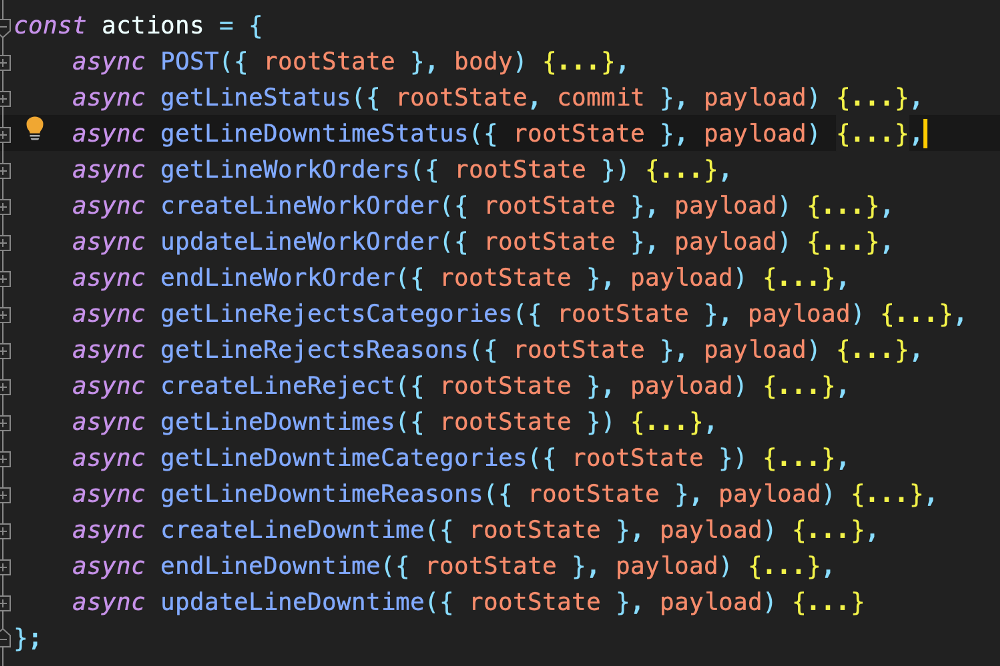
This store has 16 actions. Now imagine how many actions our Factory Core Framework has in total if we have 9 stores!
Simplifying our Actions
All our actions basically perform the same functionality. Every action does the following:
- fetch data from API (include payload if necessary)
- (optionally) store data in state
- return response to the component that called the action
To refactor these into a single action, we needed to know if the action needed to know:
- an endpoint to hit
- to send payload in the API call or not
- to commit data to state or not, and if so, to which state variable
Our current action
Here is an example of one of our actions.
async getLineWorkOrders({ rootState, commit }, payload) {
    try {
        let response = await axios.post(
           'api.factory.com/getLineWorkOrders',
           Object.assign({}, payload.body, { language: rootState.authStore.currentLocale.locale }),
           rootState.config.serviceHeaders
        );
       commit( 'setCurrentWorkOrderNumber', response.data.currentWorkOrderNumber );

       return response.data;
    } catch (error) {
       throw error;
    }
},
In this action, we fetch data from our backend API by hitting the endpoint ‘api.factory.com/geteLineWorkOrders’. After the data is retrieved, the state variable currentWorkOrder is updated. Finally, the data is returned to the component that made the call. All our actions have this format. To refactor it into a single action we need to have the endpoint, whether or not to send payload and whether or not to commit data. Here is our refactored single action:
async fetchData({ rootState, commit }, payload) {
   try {
       let body = { language: rootState.authStore.currentLocale.locale };
       if (payload) {
           body = Object.assign({}, payload.body, body);
       }
      let response = await axios.post(`api.factory.com/${payload.url}`, body, rootState.config.serviceHeaders );
      if (payload.commit) {
          commit('mutate', {
              property: payload.stateProperty,
              with: response.data[payload.stateProperty]
           });
      }
      return response.data;
   } catch (error) {
      throw error;
   }
}
This single action will handle every possible call. If we need to send data with the API call it does. If we need to commit data it does. If it does not need to commit data, it does not. It always returns data to the component.
Using one mutation
Previously for every action that needed to mutate state, we created a new mutation to handle this. We replaced them all with a single mutation. Here is our single mutation:
const mutations = {
    mutate(state, payload) {
       state[payload.property] = payload.with;
    }
};
If an action needs to store data in state, we call this mutation like this:
commit('mutate', {
    property: <propertyNameHere>,
    with: <valueGoesHere>
});
Conclusion
We have greatly simplified our actions and mutations in our stores by having just one action and one mutation.